A page structure matched to your practice type
General, pediatric, cosmetic, orthodontic, implant, oral surgery, periodontal or endodontic, each with its own layout logic.
Website design for dental practices has to account for the practice type first: a single-operatory general practice, a pediatric office with parents booking on behalf of a child, or a multi-location group with a different team at each address all need a different page structure, not the same five pages with different text. We design around your practice type from the first page.
What it costs
Detail 01
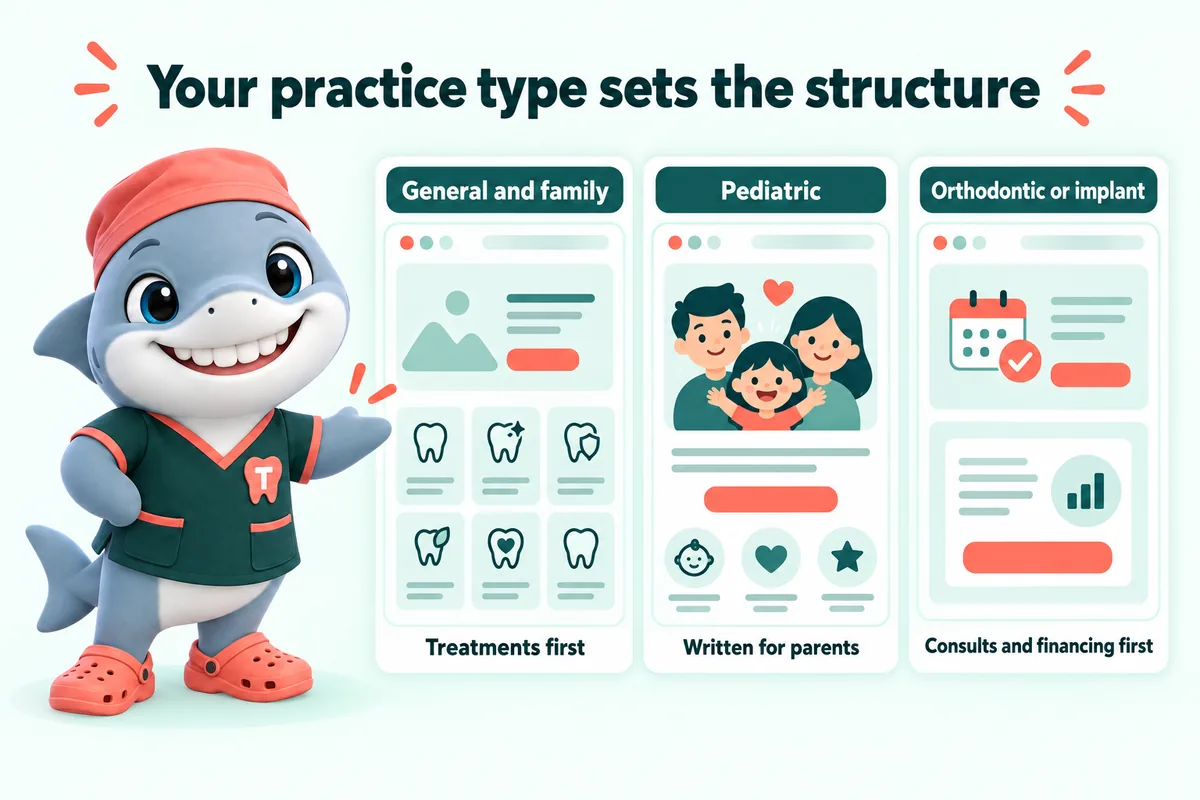
A general and family practice needs pages built around a wide range of common treatments and a family-friendly tone. A pediatric practice needs pages written for parents, not the child, with first-visit guidance and school-hour booking front and center. An orthodontic or implant practice needs pages built around consultations and financing rather than routine visits. We build the page structure to match your practice type rather than forcing every dental site into one template.
Detail 02
Every page, from the home page to a single treatment page, uses the same type scale, spacing, button styles and color system, so the site reads as one designed product rather than a collection of pages bolted together over the years. That consistency is also what makes future pages, like a new location or a new treatment, quick to add without looking like an afterthought.
Detail 03
Dental patients span every age group, including older patients who may have lower vision or less comfort with small interface elements. Text sizes, color contrast and tap target sizes are set to be comfortable for a wide range of visitors, not just to look sharp on a large designer monitor. Design that only works for the person who approved it in a meeting is not finished.
Detail 04
You never need design software or a login to request a change. Every revision is a plain-language request through your client portal, and we make the change and send a preview link. The design lives in the site, not in a file only we can open.
Deliverables
General, pediatric, cosmetic, orthodontic, implant, oral surgery, periodontal or endodontic, each with its own layout logic.
Type, color, spacing and buttons stay uniform site-wide, including pages added after launch.
Comfortable for patients across every age group, not just optimized for a designer monitor.
Hours, parking and team per location, plus the neighborhoods you serve.
Not bolted on as a separate widget; it is part of the page flow from the first draft.
Five revisions a month, any size, requested from your client portal once the site is live.
Included
Not included
The build
Four steps, and the only one you pay for before launch is the first month.
Live demo
A 30-minute walk-through of the site you would get, with your treatments, your carriers and the booking request wired the way your front desk wants it.
Speed and ads
If the practice runs Google Ads or social ads, the landing page is half the result. A slow or confusing page wastes the click you paid for. A fast, specific page helps keep it, and can help lower what you pay for the next one.
We do not promise a specific cost-per-click, percentage or ranking. We build the page the ad lands on to be fast, relevant and easy to act on.
Static pages, compressed photos and almost no JavaScript, served from Cloudflare. Every page targets 90+ on Google PageSpeed and is re-tested after each change.
Large tap targets, the booking request always one tap away, and the answer to the heading in its first sentence.
Google lists landing-page experience as one of the three parts of Quality Score, and says higher-quality ads can often lead to a lower cost per click. A fast, relevant treatment page helps on both counts.
When a page loads before the visitor gives up, fewer people bounce back to the search results, so more of the clicks you already paid for reach the booking request.
Sources: Google Ads Help, "About Quality Score" (checked September 2026); Google Ads Help, "About Ad Rank" (checked September 2026).
What you get
What every plan carries, and which plan adds the AI Engine or the Content Engine.
Cleanings, crowns, root canals, implants, aligners, whitening, emergencies and whatever else you offer, each on its own page with an FAQ block and the booking request.
Single Operatory: includedFull Practice: includedMulti-Location: included
A page per office with hours, parking, team and map, plus pages for the neighborhoods and nearby towns your patients come from. Multi-Location adds a location hub.
Single Operatory: includedFull Practice: includedMulti-Location: included
The carriers you accept, how billing works at your office, and your financing or membership options, in plain words.
Single Operatory: includedFull Practice: includedMulti-Location: included
A short request form (reason for visit, carrier, preferred times) that is clearly a request your front desk confirms, with an automatic reply to the patient.
Single Operatory: includedFull Practice: includedMulti-Location: included
Every request is pushed by API, Zapier or Make into your practice management system where it accepts external requests, and into your CRM in every case, with new patients tagged.
Single Operatory: includedFull Practice: includedMulti-Location: included
Static pages served from Cloudflare, compressed photos and almost no JavaScript, re-tested after every change.
Single Operatory: includedFull Practice: includedMulti-Location: included
Readable type sizes, color contrast and large tap targets for patients of every age, built with the WCAG guidelines in mind.
Single Operatory: includedFull Practice: includedMulti-Location: included
Hours, team, offers, carriers and treatment changes, done within 2 to 5 working days. Extra revisions are a flat fee, never hourly.
Single Operatory: includedFull Practice: includedMulti-Location: included
One place to request revisions, raise tickets and send files, with an optional named approver who signs off every change on a preview link.
Single Operatory: includedFull Practice: includedMulti-Location: included
Cloudflare hosting, a self-renewing SSL certificate, daily backups, uptime monitoring and security headers, all inside the monthly fee.
Single Operatory: includedFull Practice: includedMulti-Location: included
A domain registered in your practice's name at no charge while your plan is active, or your existing domain pointed at the new site with DNS managed.
Single Operatory: includedFull Practice: includedMulti-Location: included
The domain is in your name and the content we write is yours. On cancellation you get a full export within 14 days.
Single Operatory: includedFull Practice: includedMulti-Location: included
Every page on your current site is mapped to a page on the new one and redirected, so links and search results keep working.
Single Operatory: includedFull Practice: includedMulti-Location: included
Client words
My first check was simple: open the new patient appointments page on a phone and try to get in touch. Everything a visitor needs is up top, and the inquiry button stands out properly. Staff can now text a single link mid-call instead of narrating the menu.
The preparation page for new patient appointments works because it keeps its focus. It explains what the first conversation needs, and deliberately asks for nothing sensitive online. We include it in our first response as standard.
I wanted the new patient appointments page to show how we work, not just assert that we work well. They helped us select reference material that actually means something and explain it properly. It reads like the honest version of the calls we have every day.
Case studies
Real practices where this work was part of the build, and what changed at the front desk.
Yes. A pediatric practice website is written for parents making the booking decision, with first-visit guidance and school-hour scheduling emphasized, while a general and family practice site is built around the widest range of routine treatments. The page structure and the copy both change with the practice type.
Yes, on the Multi-Location plan. Each office gets its own location page with hours, parking, team and directions, plus a location hub, and the build fee covers the whole group rather than being charged per office.
The structure follows patterns that work for dental sites, but the design itself is built around your colors, your team and your photography, not a shared template. Two practices on the same plan will not look identical.
We set a palette and simple typographic wordmark during onboarding that reads as calm and professional for a dental practice, and you can update it later at no extra cost as part of a normal revision.
Yes. An orthodontic practice gets braces, aligner and consultation pages; an endodontic practice gets referral and same-day pages; a pediatric practice gets first-visit and parent-facing pages. The practice-type pages on this site list what each one carries before you book a demo.
Yes. Each office gets its own page with its own hours, team and map, and the booking request from that page routes to the front desk that covers it. On the Multi-Location plan we also manage a Google Business Profile for each office.
Yes. If you run a membership plan or a fee-for-service model, the financing page explains it the way your team explains it on the phone, including what it covers and what it does not. Any figure on the page is yours, published only if you want it published.
Next step
A live walk-through of the site you would get, in about 30 minutes. Plans from $137 a month, the $797 build fee invoiced only after launch, domain and hosting included.
Book a demoOr email and a person replies within one working day.
GetDentalWebsite uses the cookies below. Necessary cookies keep the site working and cannot be turned off.
Saved on this device only. Press Esc to close.